LUCIDLINK MCP SERVER
The shared data layer for agentic AI
Most AI stacks assume enterprise data is already accessible. It isn't. LucidLink gives agents and teams a shared persistent data layer to read, write and work with enterprise data, without moving it first.
Build with the AI tools your teams already use
LucidLink MCP and SDK examples work with the agent clients, coding tools and frameworks developers are already adopting across enterprise AI workflows.

Every AI workflow assumes the data is already there
Production AI workflows run into the same wall: where does the work actually live?
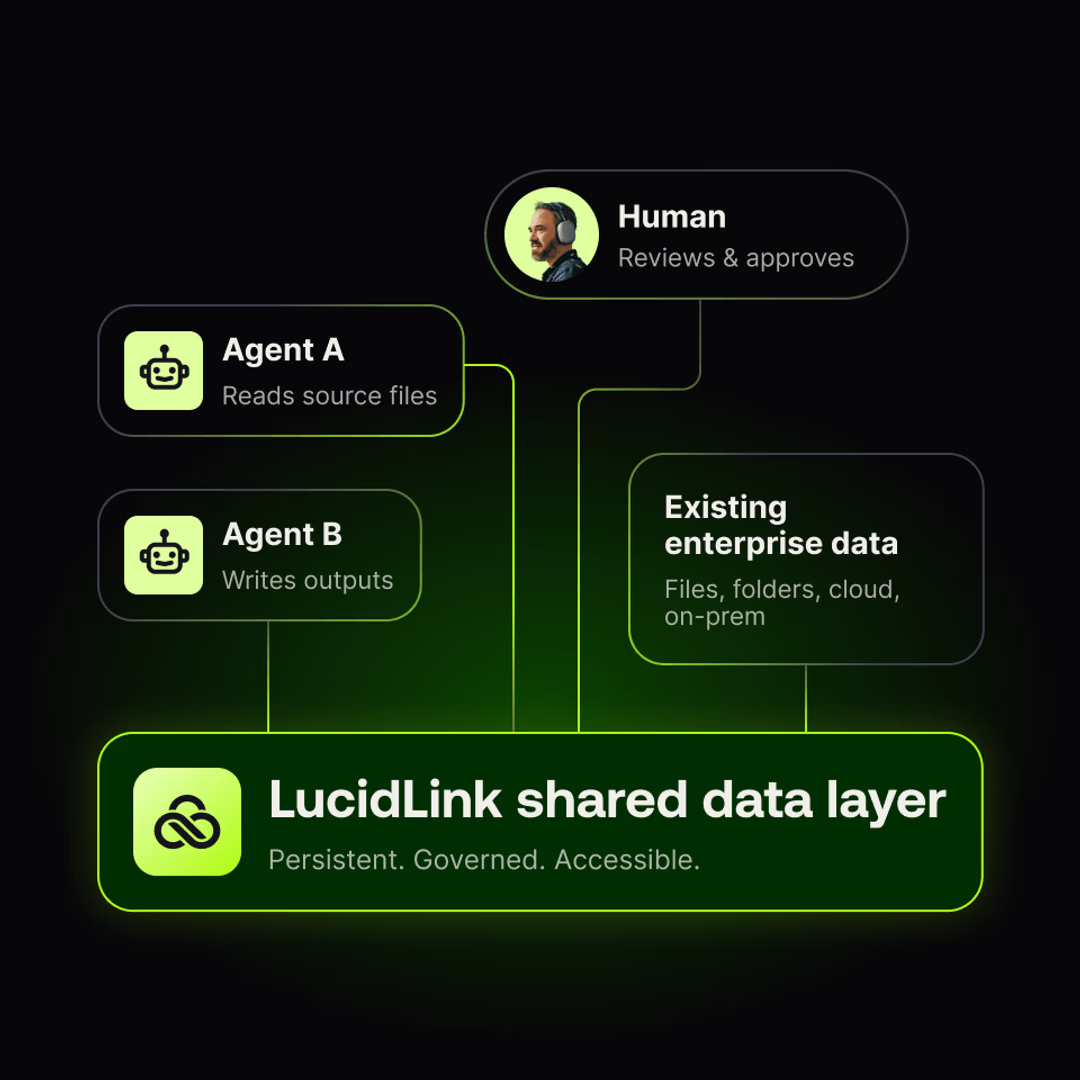
Agents need to read source files, write outputs, coordinate with other agents and hand results back to people. In demos, that data is local or preloaded. In the enterprise, it's spread across teams, clouds and permissions models that can't simply be consolidated.
LucidLink is the shared, persistent data layer underneath that work, delivered through a filespace agents and humans can use together without moving enterprise data first.
Give agents a filespace they can actually use
LucidLink MCP Server exposes filespace capabilities as tools that MCP-compatible agents can use directly.

Read filespace data
Agents read briefs, notes, documents, transcripts, folders and project files directly from a LucidLink filespace.

Write outputs back
Agents create summaries, reports, checklists, briefs or extracted data and save them back as normal files.

Search the filespace
Agents find relevant files and content without relying on manually pasted or staged context.

Lock before editing
Agents coordinate edits using LucidLink file locking, including whole-file or byte-range advisory locks.

Audit file activity when enabled
When audit is enabled by an admin, audit data helps teams understand file activity such as who changed what and when.

Run read-only
Read-only mode lets agents inspect filespace data without being able to modify it.
See an agent work directly against a LucidLink filespace
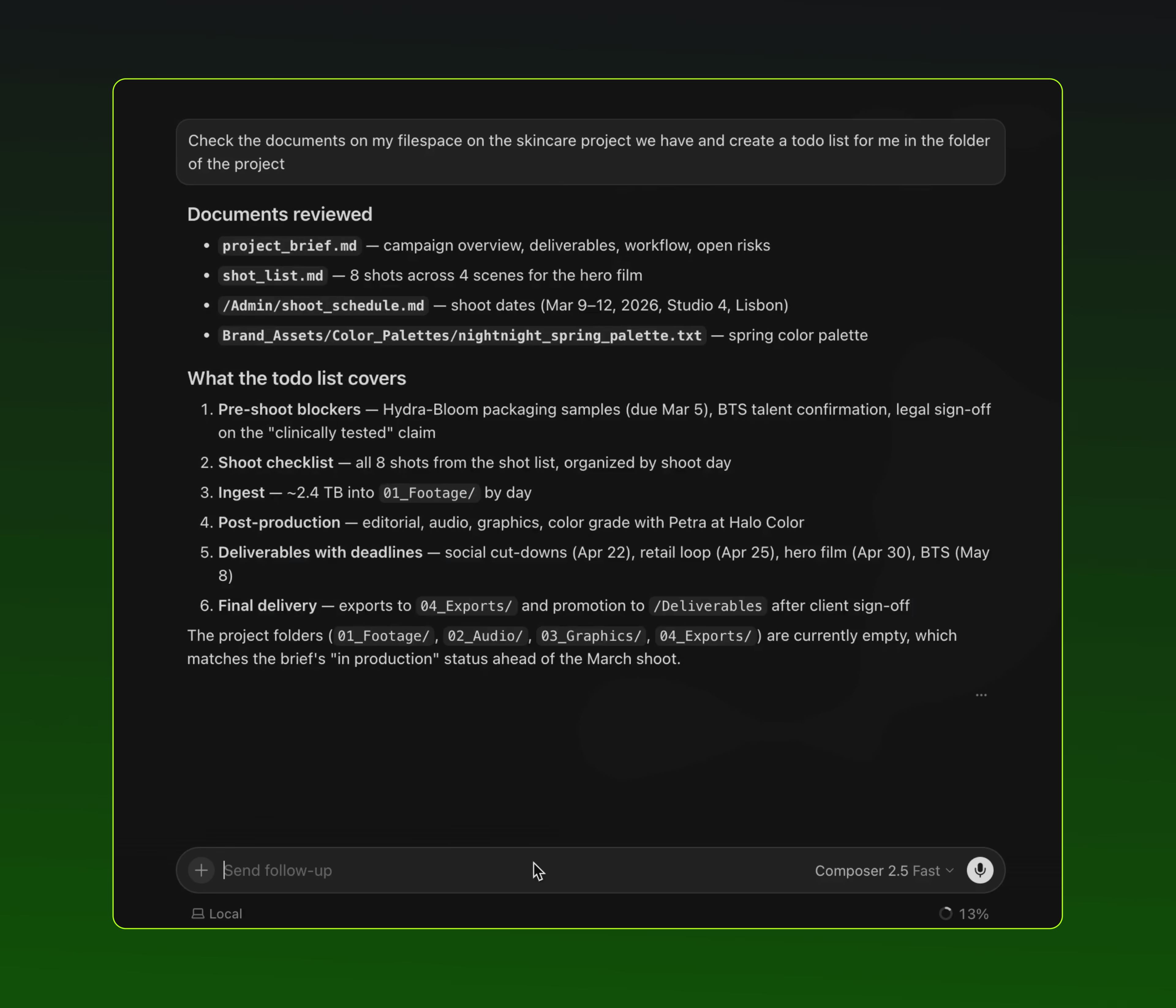
Cursor finds the relevant project, reads across multiple files and writes a TODO list directly back to the filespace.
Cursor + LucidLink MCP Server:
No context pasting required
Agent discovers relevant files through the filespace
Agent reads and summarizes across multiple files
Output lands back in LucidLink as a normal file
Human reviews in the same shared filespace
Build your way
Start with direct SDK access, wrap LucidLink as tools for your agent or use the LucidLink MCP Server so agents can discover and use filespace tools directly.
Get started with LucidLink MCP in minutes
Install uv, run the LucidLink MCP Server with uvx, configure your service-account token and register LucidLink with your MCP client.
Step one
Install and configure
Get the LucidLink MCP Server installed and your service-account token configured.
# Install uv
curl -LsSf https://astral.sh/uv/install.sh | sh
# Verify the LucidLink MCP server
uvx lucidlink-mcp@latest --version
# Configure your LucidLink service-account token
uvx --from lucidlink-mcp lucidlink-mcp-setup
Step two
Register with your MCP client
Register LucidLink with your MCP client so agents can start using filespace tools.
claude mcp add lucidlink -s user -- uvx lucidlink-mcp@latest
codex mcp add lucidlink -- uvx lucidlink-mcp@latest
{
"mcpServers": {
"lucidlink": {
"command": "uvx",
"args": ["lucidlink-mcp@latest"]
}
}
}
No infrastructure to deploy
Your MCP client launches the server when needed. No separate hosted service required.
Connect existing data without moving it first
Most workflows don’t start with data neatly staged for AI. Enterprise data often lives in object storage, existing systems, regulated environments or places where copying it into a new AI platform is slow, risky or prohibited.
LucidLink Connect makes selected S3-backed data available through the filespace, so agents can read it through LucidLink and write outputs back as normal files. The data doesn’t have to move first.
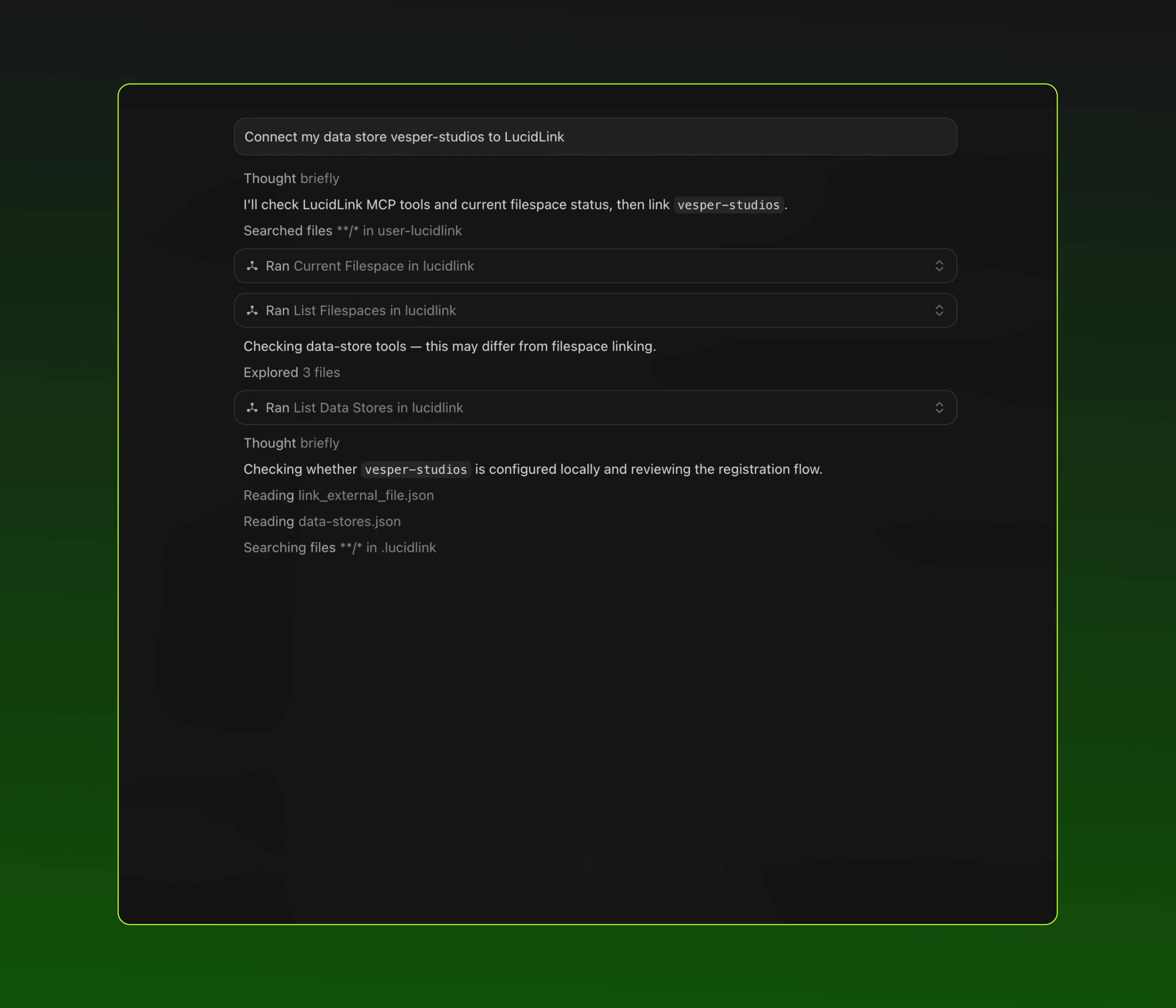
How agents work with existing data through LucidLink Connect
1. Register data stores
2. Link selected S3-backed data into LucidLink
3. Let the agent summarize or work with it
4. Output lands back in LucidLink
register my data stores
link reports/q2.csv from my-store as /data.csv
summarize /data.csv
save the summary to /summary.md
Designed to run in your environment
Runs where the agent runs
The MCP server is launched by the MCP client and does not require a separate hosted service.
No broad desktop mount required
Agents can work through MCP or SDK without exposing decrypted files through a mounted drive.
Read-only mode
Agents can inspect filespace data without being able to modify it.
Dangerous-action confirmation
Dangerous or destructive operations are flagged for explicit confirmation by the client.
Service-account access
Use a LucidLink service-account token to give the MCP server an identity.
Audit trail support
Audit file and agent activity when audit is enabled by an admin.
Go deeper in GitHub and Developer Tools
MCP package
Install or access the LucidLink MCP Server package.
Examples and workflows
Use the Python SDK, wrap SDK methods as agent tools or connect agents through MCP.
Connect SDK examples
Programmatically connect selected S3-backed data and link external objects into a LucidLink filespace.
Developer Tools
Explore LucidLink APIs, SDKs, Connect, documentation and developer resources.
OpenClaw and Hermes setup
Follow command-level setup guides for OpenClaw and Hermes
Getting started with metadata
See how to query filespace metadata in plain language, then turn what you learn into a repeatable Python workflow.
Start building with LucidLink for agentic AI
Give agents secure, persistent access to the shared data layer your teams already use.